You just got back from a conference, or your webinar ended an hour ago, and there is a fresh spreadsheet sitting in front of you. Fifty names, two hundred names, maybe two thousand if the webinar went well. The instinct is to move fast — export the list, drop it into your email tool, and start the follow-up sequence before people forget who you are.
That instinct is not wrong. Speed matters after an event. But there is one step most teams skip, and it is the one step that decides whether your follow-up emails actually reach anyone: checking whether the email addresses you collected are real.
This is what we mean by verifying leads before you nurture them. Let's break down what each of these words actually means first, since a lot of confusion in email marketing comes from people using these terms loosely.
What Does "Lead" Mean Here
A lead is simply a person who showed interest — someone who scanned their badge at your booth, filled a form to join your webinar, or dropped their business card in a bowl for a giveaway. At this stage, you don't know if they are ready to buy. You just know they gave you a way to contact them, usually an email address.
What Does "Nurturing" a Lead Mean
Lead nurturing is the series of follow-up emails you send after the event — a thank-you note, a recap of what was discussed, maybe a case study a week later, then a soft pitch. The goal is to keep the conversation going until the person is ready to talk to sales or make a purchase. It is not one email. It is usually a sequence spread across days or weeks.
What Does "Verifying" a Lead Mean
Verifying a lead means checking, before you send anything, that the email address they gave you is real and can actually receive mail. It sounds basic, but at events, it is surprisingly common for the email address on file to be wrong, mistyped, or not even a real inbox.
Why Event-Collected Emails Are Messier Than You Think
Website sign-ups usually go through a form with basic checks built in. Conference and webinar leads don't have that safety net, and there are a few honest reasons why:
People type fast and get it wrong. Someone scribbling their email at a noisy booth, or typing it quickly on a phone before a webinar starts, will make typos. "gmial.com" instead of "gmail.com" happens more often than you'd expect.
People give a "safe" email on purpose. At events with giveaways or free downloads, some attendees hand over a throwaway address just to get the freebie, not because they want to hear from you again.
Badge scanners and webinar platforms aren't always accurate either. A scanner can pull outdated data if someone registered months in advance and changed jobs since, and a webinar login can auto-fill a saved email from an old job or a personal account the person rarely checks.
None of this means people were lying to you. It just means the list you exported is not the same quality as one built from people who deliberately typed their work email into your website.
What Email Verification Actually Checks
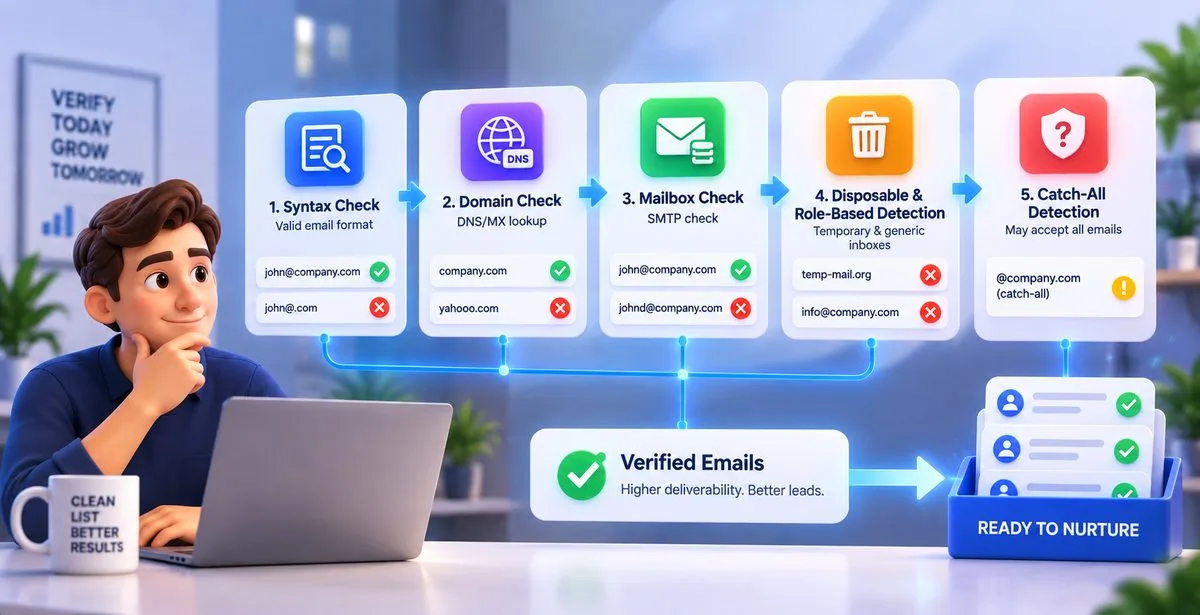
This is where the term "email verification" gets explained properly, because a lot of people think it just means checking if the email "looks" correct — like whether it has an @ symbol. It goes deeper than that.
A proper verification process checks an email address in layers:
Syntax check — confirms the address is written in a valid format. This catches obvious typos.
Domain check (DNS/MX lookup) — confirms the domain after the @ symbol actually exists and is set up to receive mail. If someone typed "yahooo.com," this step catches it.
Mailbox check (SMTP check) — this is the step people often call "pinging" an address. The verification tool contacts the receiving mail server and asks, without sending an actual email, whether that specific mailbox exists. This is how you catch a real domain with a mailbox that doesn't exist, like a mistyped username at a correct company.
Disposable and role-based detection — flags temporary email services people use to avoid giving out a real address, and generic inboxes like info@ or support@ that rarely belong to one person and rarely convert into a real lead relationship.
Catch-all detection — some company domains are set up to accept mail sent to any address at that domain, even ones that don't exist, and just silently drop it. A catch-all address looks technically valid but might never actually be read by a real person, so it needs to be flagged separately.
Once all of this runs, each address usually gets labelled as safe, risky, or invalid. That label is what should decide whether an address goes into your nurture sequence at all.
Why Skipping This Step Hurts More Than You'd Guess
Sending your first follow-up email straight to an unverified list feels harmless. What actually happens behind the scenes is more serious.
Every email that bounces back because the address doesn't exist counts against your sender reputation. Mailbox providers like Gmail and Outlook track how often mail sent from your domain bounces, gets marked as spam, or simply goes unopened. A high bounce rate early in a new sequence tells these providers that you might be sending to purchased or low-quality lists, even if that's not what happened at all.
Once your reputation takes a hit, it doesn't just affect that one campaign. Future emails from the same domain, including ones going to leads who gave you a perfectly real email address, start landing in spam folders instead of inboxes. You end up paying for one messy export for months afterward.
There's also a simpler, more immediate cost. If 15% of your post-event list is invalid, that's 15% of your follow-up effort — the personalized subject lines, the case study you attached, the calendar link — going absolutely nowhere.
A Simple Process for Post-Event Follow-Ups
Here is a straightforward order of operations that avoids most of the trouble:
- Export the raw list from your badge scanner, webinar platform, or form tool right after the event, while the data is fresh.
- Run the list through email verification before it touches your campaign tool. This single step removes invalid and disposable addresses upfront.
- Segment the results into safe, risky, and invalid. Send confidently to the safe group, consider a lighter touch for risky ones, and drop the invalid ones or follow up through another channel like LinkedIn.
- Check your sending mailbox's health, especially if you're using a newer domain or a mailbox that hasn't sent much volume before.
- Send the first follow-up within 24 to 48 hours, while the event is still fresh in the person's memory.
- Track opens and clicks to see who is actually engaging, and adjust the rest of the sequence based on that.
Why Warmup Matters Right After a Big Event
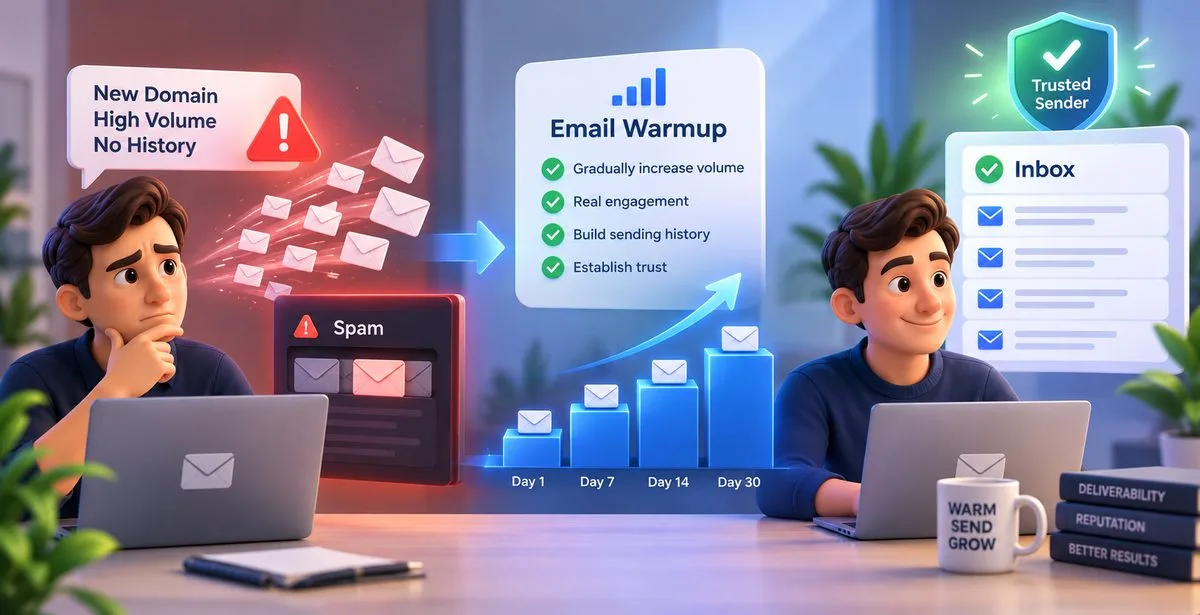
There's one detail people often miss. If you set up a new sending domain or mailbox specifically for this event, or you're about to send a much larger volume than usual, a burst of outbound email right after the event can look suspicious to inbox providers, even with a clean list.
This is what email warmup is for. A new or low-volume mailbox has no sending history, so providers treat it cautiously. Warmup is the process of gradually increasing how much mail that mailbox sends, over days or weeks, with real engagement happening along the way, so the mailbox builds a track record before it's asked to send a big batch of follow-ups. Skipping warmup on a brand-new sending account is a common reason a perfectly good event follow-up campaign still ends up in spam.
Common Mistakes Teams Make After Events
A few patterns show up again and again: uploading the raw export straight into the campaign tool with no cleaning step, treating every lead the same regardless of how they signed up, sending from a mailbox that has never sent bulk email before, and waiting a week to send the first follow-up, by which point the person has forgotten the conversation you had at the booth.
Where a Tool Like Pingovo Fits In
This whole process — verifying the list, warming up the sending mailbox, and running the actual follow-up campaign — usually needs three separate tools stitched together, and that's where most of the friction comes from.
Pingovo handles these as one workflow instead of three. You can upload the CSV or Excel file straight from your event export and run it through syntax, domain, and mailbox-level checks in bulk, then download a clean list labelled safe, risky, or invalid. If the sending mailbox is new, the warmup feature ramps up its volume gradually and shows a health score so you know when it's ready. From there, the same platform lets you build the follow-up sequence with a drag-and-drop editor, personalize each email, schedule sends, and track opens and clicks — without moving the list between different tools at every step.
A Few Quick Questions People Ask
Do I need to verify every single lead, even from a small webinar?
Yes, regardless of list size. A 50-person list with a few bad addresses can still hurt sender reputation, and a small list is cheap and quick to clean anyway.
Should I remove "risky" addresses completely, or still email them?
It depends on your risk tolerance. Many teams send to risky addresses at a slower pace, in a smaller batch, and watch how they perform before adding them to the main sequence.
How soon after the event should the first follow-up go out?
Within a day or two, while the conversation is still fresh. Waiting longer usually lowers response rates, no matter how good the list is.
Wrapping Up
Verifying leads before nurturing them isn't an extra step that slows down your follow-up — it's what makes the follow-up worth sending in the first place. A conference or webinar gets you the attention. What you do with the list in the days right after decides whether that attention turns into an actual conversation.