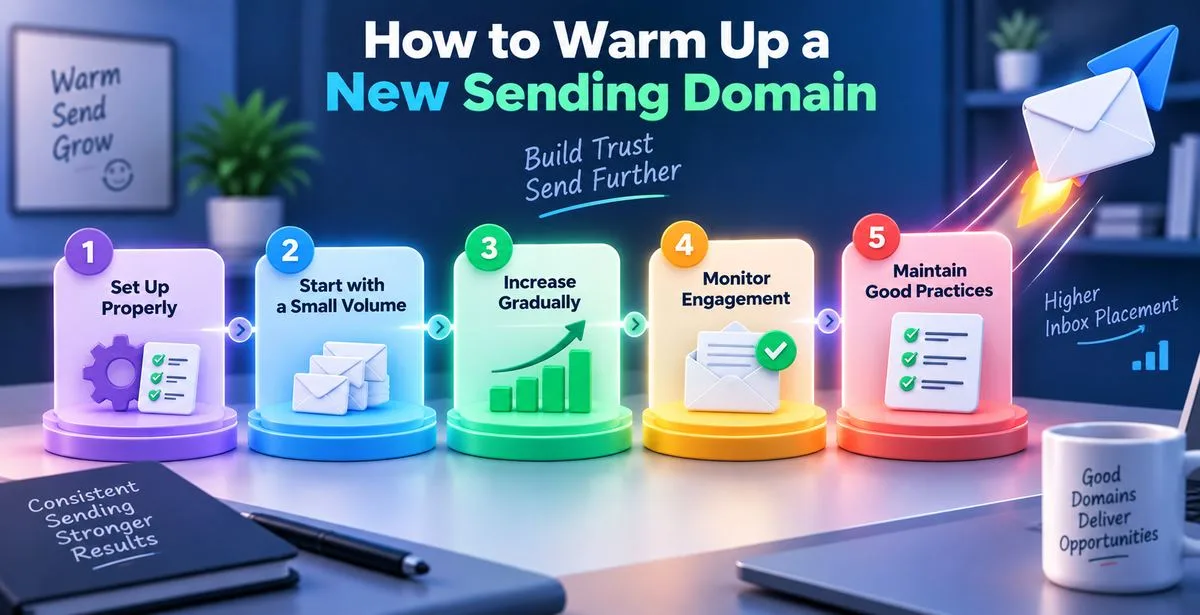
Starting to send emails from a brand new domain can be exciting but it is also a very easy way to hurt your sender reputation if you do it too quickly. Many companies spend a lot of time writing emails making lists of people to send them to and setting up campaigns. Then they send hundreds of emails on the day and they are surprised when they do not get any replies because most of the emails went to the spam folder.
The problem is usually not the email itself, it is the domain. If you are wondering how to warm up a sending domain the goal is simple: you need to show email providers like Gmail, Outlook and Yahoo that you are a legitimate sender before you start sending a lot of emails.
Warming up a domain takes patience but it is worth it because you will get better results your emails will be delivered more easily and your sender reputation will be healthier in the long run.
What Is a Sending Domain?
A sending domain is the domain name that people see in the email address you are sending from. For example if your website is yourcompany.com you might send emails from
Some companies use a domain or subdomain just for sending cold emails, like
- mail.yourcompany.com
- outreach.yourcompany.com
- yourcompanymail.com.
This helps keep the business domain safe while keeping the email outreach separate.
No matter which option you choose a brand new sending domain does not have a reputation yet. Email providers do not know if you are a trusted business or someone sending spam. Until you build trust, they will be careful.
Why Warming Up a New Domain Matters
Think of warming up a domain like building a credit history. When you get a credit card you are not given a high spending limit right away. You have to earn trust over time by using it. Email providers work in same way.
When they see a new domain sending a few legitimate emails that people open and reply to they start to trust the sender more. This trust helps with email delivery getting emails into the inbox and building a sender reputation over time. Without this trust well-written emails can end up in the spam folder.
What Happens If You Skip Domain Warm-Up?
This is where many companies make a mistake. A new domain that suddenly sends hundreds of emails looks suspicious. From the email providers point of view this is what spam campaigns often look like.
The result can be bad:
- emails go to spam
- few people open them
- you might get sending limits
- you could get blocked
- your sender reputation can be hurt.
Fixing a reputation takes a lot longer than doing the warm-up correctly from the start.
Prepare Everything Before Sending Your First Email
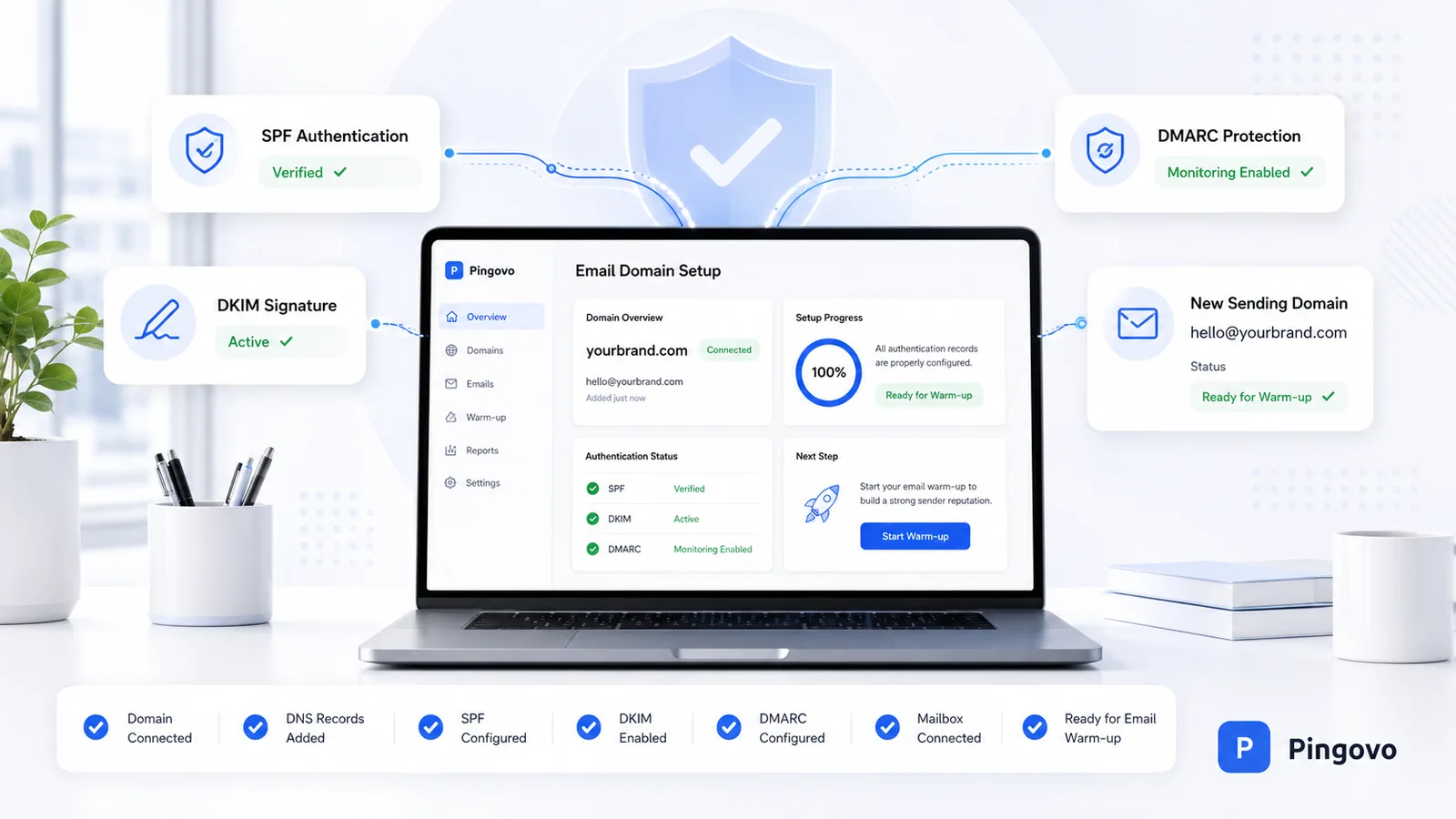
The warm-up starts before you send your email.
There are a few settings that tell the email servers that your emails are legitimate and have not been changed.
Configure SPF
SPF tells the email servers which services are allowed to send emails for your domain. If you use Google Workspace, Microsoft 365 or an email outreach platform SPF helps verify that they are allowed to send emails for your domain.
Without SPF some providers might not trust your emails.
Set Up DKIM
DKIM adds a signature to every email. This signature confirms that the email has not been changed after it was sent.
Most modern email platforms provide DKIM records that you just need to add to your domains DNS settings
Enable DMARC
DMARC works with SPF and DKIM. It tells the email servers what to do if an email fails the authentication check.
Even if you start with a monitoring policy of strict enforcement DMARC gives you insight into how your domain is being used and helps protect against domain spoofing.
Together SPF, DKIM and DMARC form the basis of email authentication. Without them warming up a sending domain becomes much harder.
Create Real Inbox Activity
One thing that is often overlooked is that sending emails alone is not enough. Healthy email accounts behave like people.
That means :
- Sending emails
- Getting replies
- Opening messages
- Moving emails out of spam if necessary
- Marking messages as important
- Having normal conversations.
Positive engagement signals help build trust with the email providers.
Many companies use email warm-up tools like Pingovo that automatically exchange emails between trusted inboxes to simulate these natural interactions.
While these tools can help they should not replace communication with real people.
Start With a Small Daily Volume
The biggest mistake during domain warm-up is sending much too soon. There is no one-size-fits-all number because every domain, provider and audience is different. However gradual growth consistently produces better results than sudden spikes.
A good starting point looks like this:
-
Day 1-3: 5 to 10 emails per day
-
Day 4-7: 10 to 20 emails per day
-
Week 2: 20 to 40 emails per day
-
Week 3: 40 to 80 emails per day
-
Week 4: Keep increasing if engagement remains healthy
If you are warming up inboxes increase each mailbox separately rather than sending all emails through one account.
Consistency is more important than speed.
A Four-Week Domain Warm-Up Plan
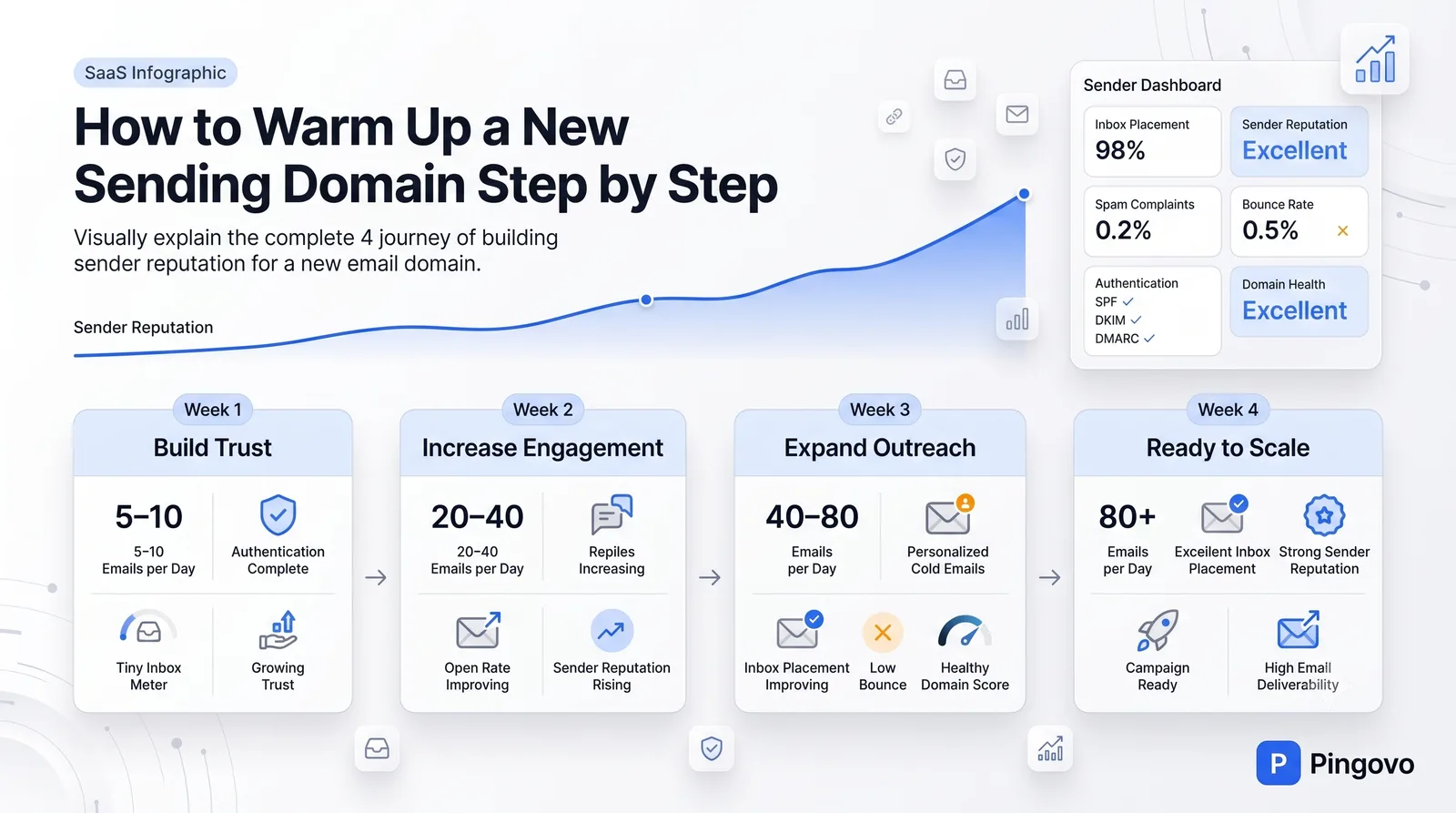
Week 1: Build Trust
Keep the sending volume low. Send mostly to people who're likely to interact with your emails, including colleagues, business contacts or existing customers.
Watch for
- successful delivery
- replies
- low bounce rates
- no spam warnings.
This week is about establishing a sending history.
Week 2: Add More Conversations
Gradually increase the number of emails. Mix real conversations with targeted outreach. If you are using email personalize every message instead of relying on generic templates. Higher engagement sends signals to email providers.
Week 3: Introduce Small Outreach Campaigns
Your sender reputation should now be developing.
Begin testing larger campaigns while continuing to monitor:
- Bounce rate
- Reply rate
- Spam complaints
- Inbox placement.
Avoid doubling your sending volume
Steady growth is always safer.
Week 4: Prepare for Scale
If performance has remained healthy you can continue increasing your volume. At this stage avoid dramatic jumps.
For example increasing from 80 emails to 300 in a day is much riskier than moving gradually from 80 to 100, then 120 then 150.
How Long Does Domain Warm-Up Usually Take?
Most companies should expect to spend between three and six weeks warming up a sending domain.
The exact timeline depends on several factors:
- Daily sending consistency
- Email engagement
- Authentication setup
- List quality
- Sending volume
- Recipient behavior.
If you are planning high-volume email outreach taking the six weeks is often worthwhile.
Rushing rarely saves time if it leads to deliverability problems later.
Signs Your Domain Is Warming Up Successfully
You do not need dashboards to notice progress.
Healthy domains often show encouraging signs:
- Most emails reach the inbox
- Open rates remain stable
- Replies begin arriving consistently
- Bounce rates stay low
- Spam complaints are minimal
- No temporary sending restrictions appear
If inbox placement continues improving as sending volume increases your domain is likely building a sending reputation.
Common Mistakes That Hurt Sender Reputation
Many deliverability problems come from habits that seem harmless at first.
Some of the common mistakes include:
- Sending hundreds of emails on the first day
- Buying outdated email lists
- Ignoring SPF, DKIM or DMARC
- Sending identical templates to everyone
- Increasing volume too quickly
- Using poor-quality prospect data
- Continuing to send despite rising bounce rates
- Never monitoring deliverability metrics
One mistake does not necessarily ruin a domain. Several together can quickly damage its reputation.
Tools That Can Help
You do not have to manage every part of domain warm-up. Tools like Pingovo make the process easier.
Email warm-up platforms automatically generate natural inbox activity and engagement signals between verified accounts.
Email verification tools reduce bounce rates by removing email addresses before campaigns begin.
Deliverability monitoring tools help you check inbox placement, blacklist status, authentication records and sender reputation.
Cold email platforms often include sending schedules making it easier to increase volume safely instead of all at once.
No tool can compensate for sending practices but Pingovo can make warm-up much smoother.
When Is a Domain Ready for Campaigns?
There is no number that guarantees success. Instead of focusing only on time or daily volume, pay attention to performance.
A domain is generally ready to scale when:
- Authentication is configured correctly
- Emails consistently reach inboxes
- Bounce rates remain low
- Spam complaints are rare
- Reply rates are healthy
- Sending volume has increased gradually without issues
Then continue scaling carefully.
Experienced email teams rarely make large jumps because reputation is much easier to maintain than repair.
Best Practices for Maintaining a Strong Sending Reputation
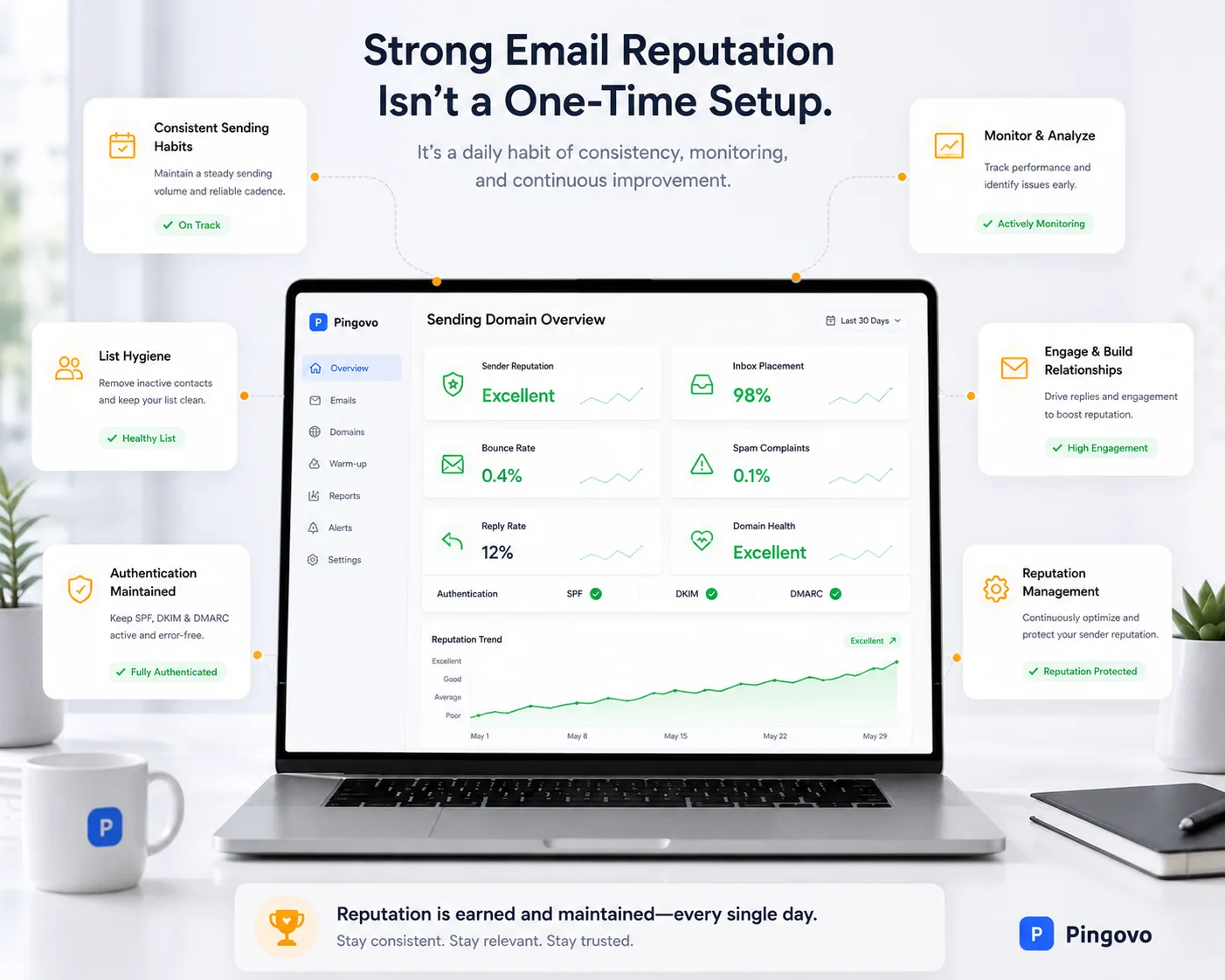
Domain warm-up does not end once you start campaigns.
Maintaining a sending reputation is an ongoing process.
A few habits make a difference, over time.
- Send emails on a schedule do not send them in unpredictable bursts.
- Keep your email lists up to date and clean.
- Remove any inactive email addresses from your list on a regular basis.
- Try to personalize your emails whenever you can.
- Check the bounce rates and spam complaints after every email campaign.
- Do not use misleading lines in your emails.
- Make it easy for people to opt out of your emails.
- Continue to monitor SPF, DKIM and DMARC as your email system changes.
The businesses that have the best email deliverability are not the ones that send the most emails. They are the ones that send the most consistent email campaigns. Email deliverability is very important for businesses that rely on email campaigns.
Final Thoughts
Learning how to set up an email domain is not about finding quick fixes. It is about giving email providers reasons to trust your email domain before you start using it to send a lot of emails. Email providers need to trust your domain.
Start by setting up email authentication then send a small number of emails encourage people to engage with your emails and slowly increase the number of emails you send over several weeks. Do not try to speed up the process just because you get results at first.
A set-up email domain is a valuable asset for your business. It helps your emails get to the inbox protects your reputation as a sender and makes it more likely that your future email campaigns will reach the people you want to reach. Email campaigns are important, for businesses.
If you plan to send emails for a long time taking the time to set up your email domain is one of the best things you can do to make sure your emails get delivered. It is worth the time and effort to set up your email domain properly.