If you have ever sent cold emails from your regular work email ID, you already know the pattern. The first fifty go out fine. Somewhere after that, replies stop coming, open rates drop close to zero, and a few emails land in spam even for people you have written to before. This is not bad luck. It is what happens when one inbox carries more outreach than it was ever built to carry.
This is where the idea of "cold email infrastructure" comes in. It sounds technical, but it simply means the full setup behind your outreach — which domains you send from, how many inboxes you use, how those inboxes are warmed up, and how your contact list is checked before anything goes out. Get this setup wrong, and even a well-written email won't reach anyone. Get it right, and an average email still lands in the inbox and gets read.
What "cold email" actually means
Cold email is a message sent to someone who has never spoken to you and did not ask to hear from you. That is different from a newsletter or an email to an existing customer, where the person already knows your business and has agreed to receive mail from you. Because the recipient has no history with you, mailbox providers like Gmail and Outlook watch cold email far more closely than they watch mail to people who already open and reply to you regularly.
That closer watching is exactly why infrastructure matters so much for cold email specifically. A single business inbox sending a handful of emails a day to known contacts rarely runs into trouble. A sales team sending hundreds of first-touch emails a day to strangers runs into trouble almost immediately, unless that sending is spread out properly.
Why one inbox hits a wall
Any e-mail account, be it Gmail, Outlook, or a hosted mailbox at your domain – every one of them has a daily sending limit. Google or Microsoft will not tell you how many messages a mailbox can send per day, but it is common knowledge within the email marketing community. A fresh account needs to send no more than 20-40 messages a day, or it will begin to trigger spam filters. After that, any mailbox is considered suspicious, regardless of the quality of the message.
This isn't an arbitrary rule. A sudden jump in volume from an account with no sending history looks exactly like what a spam account does on day one — the filter has no way to read intentions, only patterns.
So if your outreach plan calls for 300 emails a day, one inbox cannot do that safely. You either send far below what your business needs, or you get flagged. Neither is a real solution.
Domain reputation, explained simply
Every domain you send from builds up a reputation over time, a bit like a credit score. Mailbox providers track how people react to mail from that domain - how many open it, how many reply, how many mark it as spam, how many bounce because the address doesn't exist. Good reactions build trust; bad ones lower it. Once a domain's reputation drops, every email from that domain suffers, including your legitimate business mail.
That's why experienced senders never run cold outreach from their main company domain. If your primary domain — the one behind your website, your invoices, and your regular customer emails - gets flagged as a spam source because of an aggressive campaign, the damage doesn't stay contained to that campaign. It can follow your entire business.
The fix: separate domains, separate inboxes
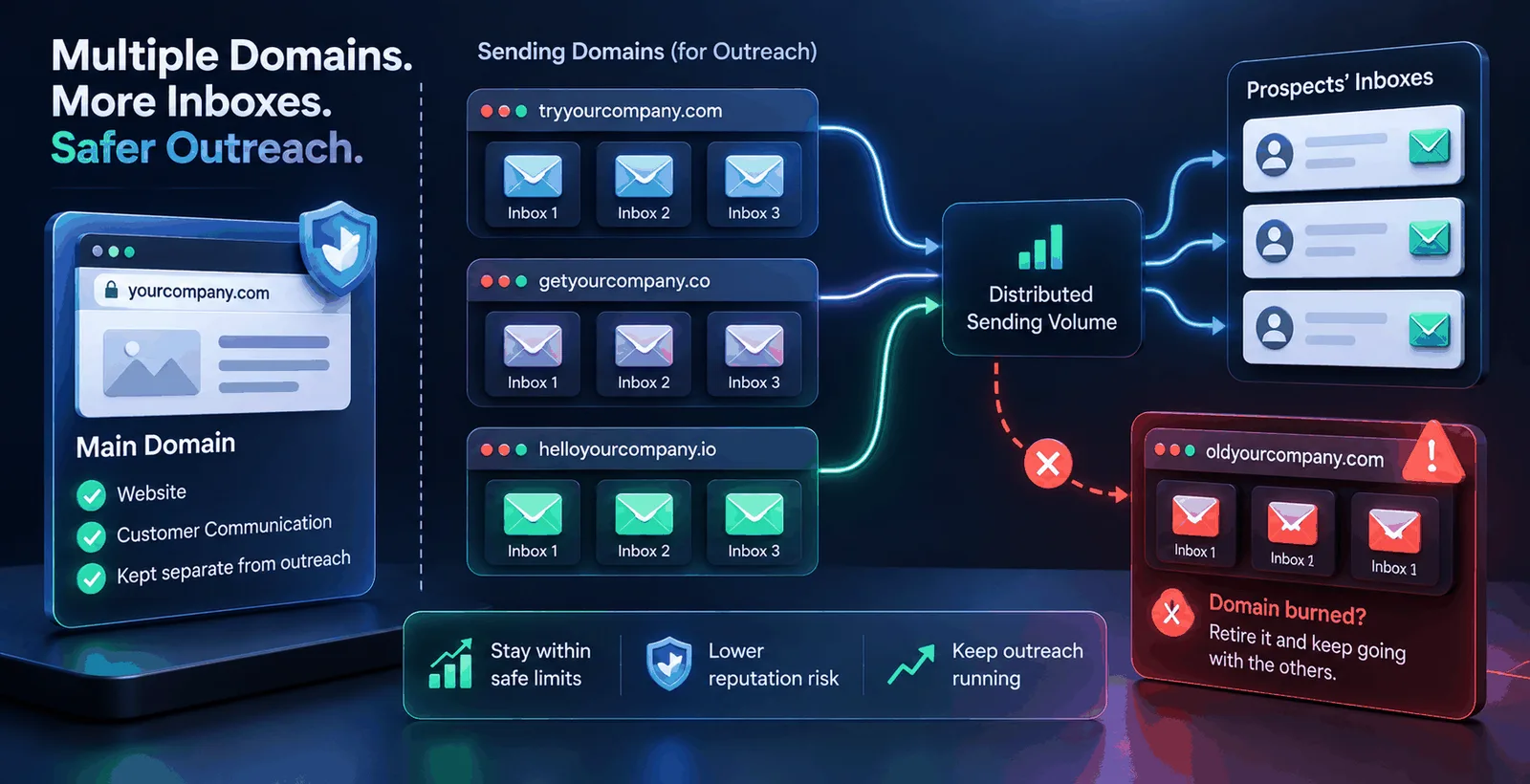
The standard way to solve both problems, sending limits and reputation risk, is to spread outreach across more than one domain and more than one inbox instead of forcing it all through a single account.
A typical setup looks roughly like this. Your main domain, say yourcompany.com, stays untouched by cold outreach and is kept for your website and real customer communication. For sending, you register a few related domains, such as tryyourcompany.com or getyourcompany.co, and set up two or three inboxes on each. Outreach volume is then divided across all these inboxes, so no single mailbox crosses the safe daily limit, and no single domain carries all the reputation risk.
If one of these sending domains ever does get burned — meaning its reputation drops badly enough that mail stops reaching inboxes — you retire it and keep going with the others. Your whole outreach engine doesn't go dark just because of one bad domain.
Why every new inbox still needs warmup
Buying a fresh domain and setting up new inboxes doesn't by itself make anything land in the inbox. A brand-new mailbox has zero sending history, and as covered above, no history looks suspicious to a spam filter, no matter how clean the domain is.
Warmup exists to fix exactly this problem. It is the process of sending a small, gradually increasing number of emails from a new mailbox to a network of other real mailboxes, which open the mail, reply to some of it, and pull it out of spam if it lands there by mistake. Over one to three weeks, this teaches the mailbox provider that the account sends mail people actually want, so it earns the ability to send in higher volume. Skipping this and sending full cold volume from day one is one of the fastest ways to burn a brand-new domain before it's even been used properly.
Because mailbox providers treat each inbox separately, warmup has to run on each one individually. Ten new inboxes means ten warmup schedules running at once, not one shared schedule for the whole domain — which is also why experienced senders start warming up inboxes well before a campaign is due to launch. The ramp-up genuinely takes time and shouldn't be rushed.
Verification matters more, not less, with multiple inboxes
It's tempting to assume that once several inboxes share the load, list quality matters less, since no single account absorbs the full hit. The opposite is true. A bounce or a spam complaint still damages whichever domain sent that email, and if your list has a large share of dead or fake addresses, that damage spreads across every domain in your setup instead of staying contained to one.
Email verification checks each address before you send — confirming the format is correct, checking that the domain can receive mail, and confirming through a direct check with the receiving server that the specific mailbox exists, without sending anything to it. Addresses that are disposable, role-based like info@ or support@, or part of a catch-all domain (one that accepts mail for any address, real or fake) get flagged separately, since they behave differently from a normal personal inbox. Removing bad addresses before sending keeps your bounce rate low across every inbox you run, protecting the reputation warmup has been building.
How many inboxes and domains do you actually need
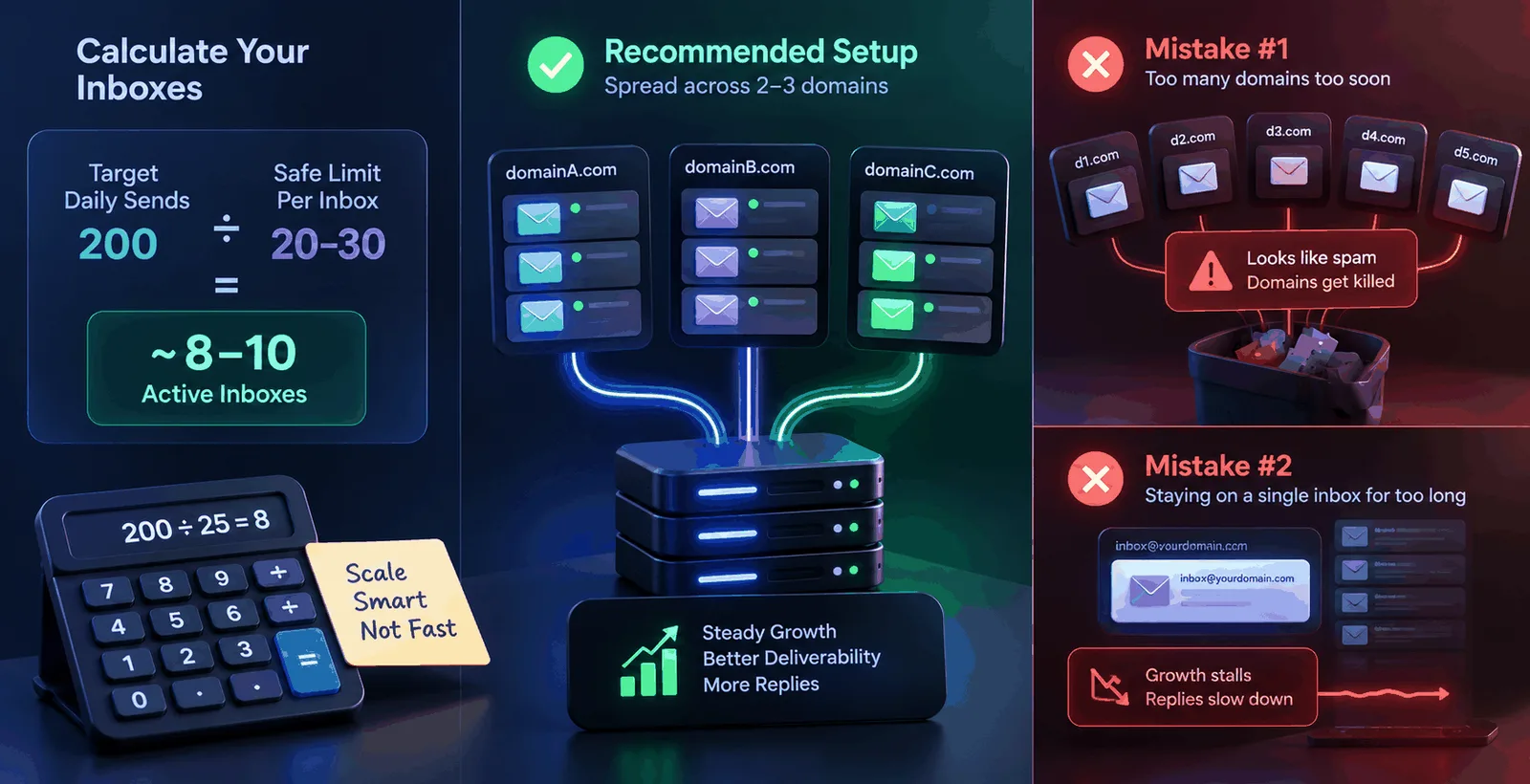
There's no single right number, but a rough way to work it out is dividing your target daily send volume by a safe per-inbox limit, usually 20 to 30 emails a day once a mailbox is fully warmed up. Want to send 200 emails a day safely? That's roughly eight to ten active inboxes, spread across two or three domains rather than crammed onto one.
Most teams make a mistake in one or the other direction. Some buy multiple domains right away and try to warm them all up at once, and it looks like spam to the mailbox providers, and they kill all of the domains within days. And others just stay on a single inbox for too long, because setting up other domains seemed like a pain, and they capped their growth without realizing why replies have slowed down.
Where a tool actually helps
Running this by hand– tracking warmup schedules per inbox, checking bounce rates and complaint ratios across domains, verifying lists before sending, and juggling multiple SMTP connections at once - it's too much mental overhead to think about once you have two or three inboxes.
This is the gap Pingovo is built to close. Warmup runs automatically for every inbox on its own interval, with health score showing in plain sight in numbers if an account is still cold, warming up, or trusted. Verification checks your list on a DNS, MX, and SMTP level before a single email is sent, so you can be certain that a stale list isn't quietly killing every domain you're running. And since Pingovo supports multiple SMTP connections and custom domains in one account, you can send and track campaigns across several inboxes from a single dashboard, instead of juggling separate tools for verification, warmup, and sending.
None of this replaces the judgement of deciding how many domains and inboxes your outreach needs. What it removes is the manual tracking that usually pushes people to either move too fast and burn domains, or stay too cautious and never scale at all.
Frequently asked questions
Do I really need more than one domain for cold email?
If you're sending more than roughly 30 to 40 emails a day to people who haven't interacted with you before, yes. One inbox on one domain can't safely carry higher volume without risking spam placement, and it puts your main business domain's reputation at risk in the process.
How long does warmup take before an inbox is ready for cold outreach?
Most inboxes need one to three weeks of gradually increasing warmup activity before they can handle a full cold outreach load safely. Starting warmup early, even before your campaign copy is finalised, is generally a good idea.
Can I use subdomains instead of buying separate domains?
Yes. Many senders use subdomains of a domain they already own, such as mail.yourcompany.com, as long as it's kept separate from the domain used for the main website and everyday business email.
What happens if a sending domain's reputation drops badly?
You stop sending from it, let it rest, and usually start fresh with warmup on a new domain rather than trying to repair the old one quickly. Reputation recovers slowly, so most experienced senders treat a badly burned domain as retired rather than something to salvage in a hurry.
Does list verification matter for a small campaign?
Yes. Even a small list with a high bounce rate can damage a brand-new domain's reputation before it's had any chance to build trust, so verification matters at every scale, not just for large sends.