If you use Gmail or Yahoo, you may have noticed an “Unsubscribe” option next to a sender’s name. It gives recipients a simpler way to leave a mailing list without visiting a website or logging in. That is the idea behind one-click unsubscribe.
For bulk email senders, this is more than a convenient feature. Since 2024, Gmail and Yahoo have required it for certain marketing and subscription emails, and Gmail stepped up enforcement in November 2025. The requirements depend on the provider and the messages you send.
So, what does your email setup need? This guide explains who the rules apply to, how the unsubscribe headers work, and what to check before your next campaign.
What Is One-Click Unsubscribe?
One-click unsubscribe lets subscribers leave a mailing list through their email provider’s unsubscribe option, without visiting a separate webpage or logging in.
Compare that with the longer process: someone scrolls to the bottom of an email, clicks a link, and lands on a page asking for their email address or confirmation. If leaving feels difficult, they may hit “Report spam” instead.
The inbox option works through instructions in the email headers, separate from the unsubscribe link in your email’s footer. Gmail and Yahoo use these instructions to process the request, although the option may not appear on every message.
For senders covered by these requirements, a visible unsubscribe link in the email body is still needed. The two options work together.
How Does One-Click Unsubscribe Work?
Every email has a header containing background information that you usually don’t see, such as who sent the message. One-click unsubscribe uses two specific headers:
- List-Unsubscribe: Provides the HTTPS address where the unsubscribe request should go.
- List-Unsubscribe-Post: Tells the receiving provider that this address supports a one-click unsubscribe request.
When a subscriber uses the provider’s unsubscribe option, their email provider sends an HTTP POST request to that address. Your sending system then processes the request and stops future emails from the relevant mailing list.
The subscriber doesn’t need to visit your website, log in, or enter their email address again.
This process follows RFC 8058, the technical standard for one-click unsubscribe. Both headers must also be covered by a valid DKIM signature.
If you use an email marketing platform, check whether it supports these headers and processes the requests correctly. Adding an unsubscribe link to your email footer alone does not enable this feature.
Email verification checks address validity, while unsubscribe management records who no longer wants your emails.
Who Needs to Follow One-Click Unsubscribe Requirements?
The requirements depend on your sending volume, the receiving provider, and the type of email you send.
Gmail sender guidelines
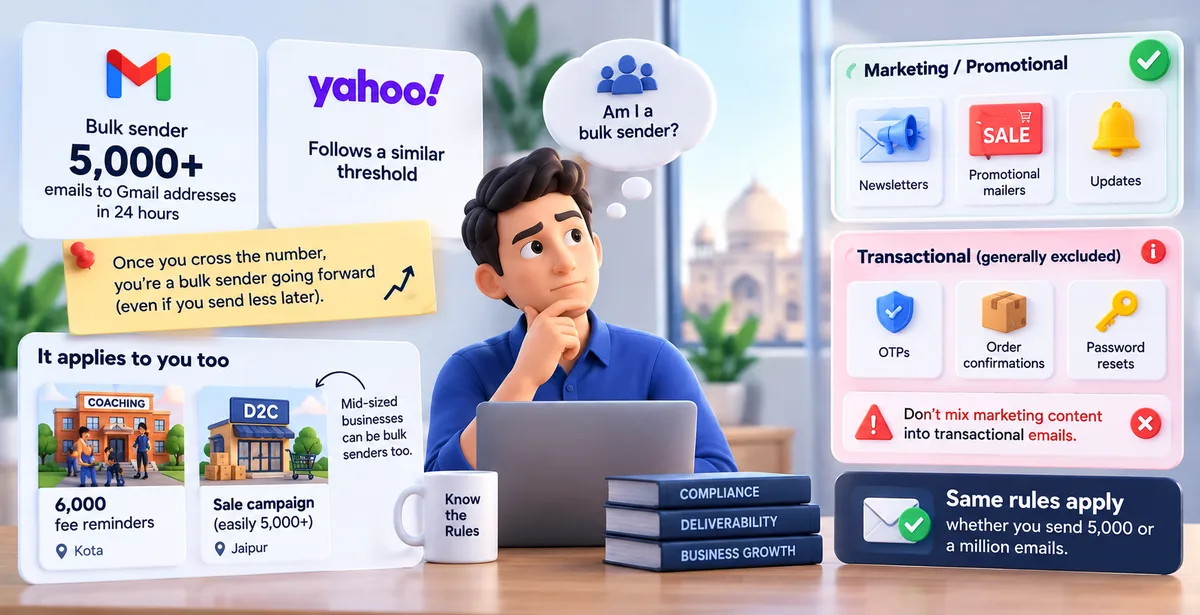
Google considers a sender a bulk sender when they send close to 5,000 or more messages to personal Gmail accounts within 24 hours. Messages from the same primary domain and its subdomains count together.
Once Google classifies a sender as bulk, that classification remains even if their volume drops.
For these senders, marketing and subscription emails must support one-click unsubscribe and include a clearly visible unsubscribe link in the message body.
Gmail one-click unsubscribe requirements apply to these senders’ marketing and subscription emails.
Yahoo bulk sender rules
Yahoo one-click unsubscribe requirements also apply to bulk senders’ marketing and subscription messages. However, Yahoo does not publish a fixed numerical threshold.
Don’t assume Gmail’s 5,000-message threshold applies to Yahoo. Outlook.com, Hotmail, and Live.com also began enforcing bulk-sender requirements in May 2025, mainly around email authentication, so check those inboxes too.
What about transactional emails?
Purely transactional messages, such as password resets and order confirmations, are generally outside this one-click requirement.
Adding promotional content can change how a message is classified, so keep essential account updates separate from marketing campaigns.
What Senders Need to Set Up
Your unsubscribe option needs to work from the inbox through to your mailing list.
Here’s what to check with your email provider or developer.
1. Add both unsubscribe headers
Include a List-Unsubscribe header with an HTTPS unsubscribe address and a List-Unsubscribe-Post header with the value `List-Unsubscribe=One-Click`. A mailto address alone does not meet the RFC 8058 standard.
2. Make sure the unsubscribe address works
The address must accept an HTTP POST request and identify the correct subscriber and mailing list. It should process the request without asking for a login, an email address, or another confirmation.
3. Check email authentication
Bulk senders need SPF, DKIM, and DMARC configured correctly. Gmail expects both SPF and DKIM on every bulk sending stream, including any third-party tools you use. The DKIM signature must cover both unsubscribe headers. For DMARC to pass, SPF or DKIM must pass and align with the domain in your From address.
4. Keep a visible unsubscribe link
Your email body still needs an easy-to-find unsubscribe link. Don’t hide it in tiny text or colours that blend into the background.
5. Update your mailing lists promptly
Process unsubscribe requests within two days, preferably immediately. Keep opt-outs synced across your sending tools so an old list import doesn’t accidentally resubscribe someone.
What Indian Email Senders Should Consider
Being based in India does not change Gmail or Yahoo’s bulk sender requirements. If your messages reach their users and your sending activity meets their criteria, the same rules apply.
For example, an Indian online store sending promotional campaigns to personal Gmail accounts must check its sending volume and unsubscribe setup.
Email compliance involves both mailbox provider requirements and the privacy laws applicable to your business.
Keep provider requirements separate from privacy law
The DPDP Act concerns personal data protection. Gmail and Yahoo’s one-click unsubscribe requirements concern how senders deliver email to their users. Meeting one does not automatically satisfy the other.
As of October 2026, the DPDP framework is being introduced in phases. Its main consent and data-processing obligations are scheduled to commence in May 2027 under the notified timeline.
Meanwhile, keep records of how subscribers joined your list, explain what emails they can expect, and make opting out straightforward. These email marketing best practices also make future compliance easier.
If an agency manages your campaigns, confirm who handles unsubscribe requests and updates your contact database. An opt-out should remain effective when you change agencies or sending platforms.
What Happens If You Don’t Comply?
Missing one-click unsubscribe leaves covered senders outside Gmail’s requirements and makes them ineligible for delivery support or mitigations. Since November 2025, Gmail has increased enforcement of its broader sender requirements.
Authentication and other technical failures can lead to temporary or permanent rejections, but missing one-click unsubscribe alone does not automatically trigger rejection or spam placement.
The practical risk is subscriber frustration. If someone cannot stop your emails easily, they may report them as spam instead. Google recommends keeping your spam complaint rate below 0.1% and never reaching 0.3%.
Higher complaint rates can damage your sender reputation and affect email deliverability.
Continuing to send campaigns after someone unsubscribes makes the problem worse. A working button means little if your system keeps the person on the mailing list.
Also, separate unsubscribe problems from authentication failures. Missing SPF, DKIM, or DMARC requirements can cause delivery issues of their own. Fixing the unsubscribe option alone won’t resolve every reason your emails are being blocked.
Common One-Click Unsubscribe Mistakes
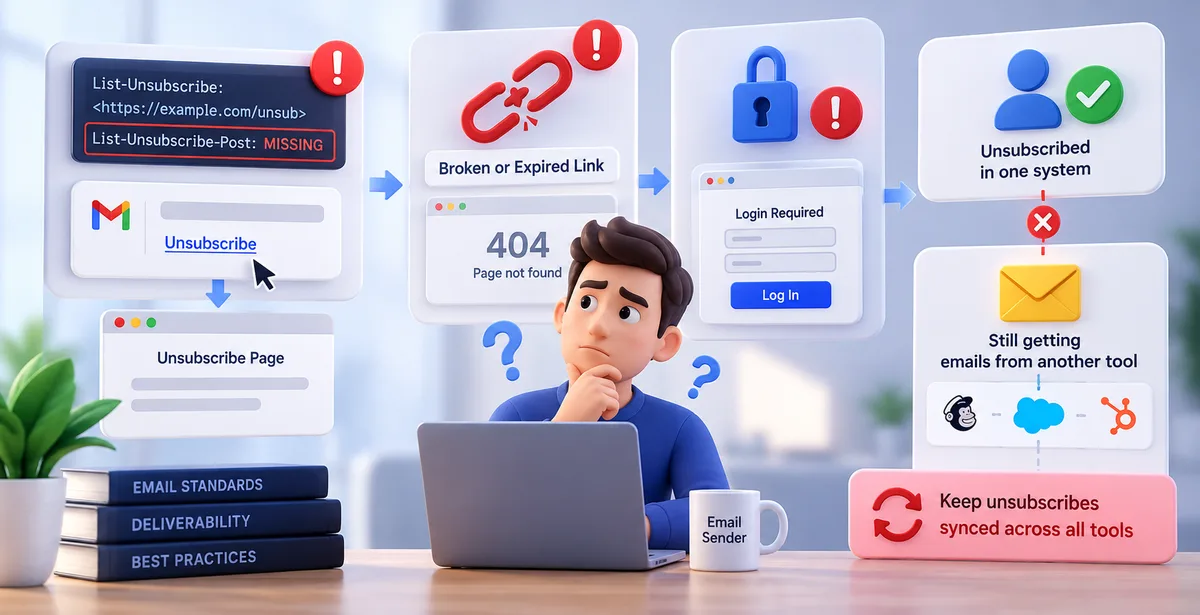
Small setup errors can leave an unsubscribe process incomplete.
Check for these before your next campaign.
- Relying only on the footer link: A visible link is still needed, but it does not replace the required unsubscribe headers.
- Using only a mailto address: RFC 8058 one-click unsubscribe needs an HTTPS address that accepts POST requests.
- Adding headers without a working endpoint: The unsubscribe address must actually process requests and update the relevant mailing list.
- Asking subscribers to log in or confirm again: The header-based process should work without another webpage, form, or confirmation step.
- Leaving the headers outside the DKIM signature: Both unsubscribe headers must be covered by a valid DKIM signature.
- Reimporting unsubscribed contacts: Uploading an older contact list should not override a subscriber’s opt-out.
- Assuming a missing inbox button means failure: Gmail decides whether to display its unsubscribe option. Check the headers and request handling rather than relying on appearance alone.
How to Test One-Click Unsubscribe
Test the complete process before sending a campaign. Seeing an unsubscribe link is only the first check.
1. Send a campaign to test addresses.
Use Gmail and Yahoo accounts you control, subscribed through your normal sending process.
2. Inspect the email headers.
In Gmail, open “Show original.” Look for the HTTPS address in `List-Unsubscribe` and the value `List-Unsubscribe=One-Click` in `List-Unsubscribe-Post`.
3. Check authentication.
Confirm that DKIM passes. Ask your developer to verify that its signature covers both unsubscribe headers.
4. Test the unsubscribe request.
Use the inbox unsubscribe option if it appears. Otherwise, ask your developer to test an RFC 8058 POST request using a test subscriber. Opening the URL in a browser alone does not test this.
5. Confirm the contact’s status.
Check that your platform records the opt-out and excludes the address from future campaigns for that mailing list. Process requests within two days, preferably immediately.
6. Test the footer link separately.
Make sure it works and is easy to find. Repeat these checks after changing your email platform or unsubscribe settings.
Conclusion
Subscribers should be able to leave your mailing list without extra steps. For covered bulk senders, that means working unsubscribe headers, correct authentication, a visible footer link, and prompt processing.
Before your next campaign, test what happens after someone clicks unsubscribe. Confirm that their preference reaches your contact database and stays in place when you import lists or switch tools.
When sending campaigns with Pingovo, make unsubscribe testing part of your regular pre-send checklist, alongside list cleaning and authentication checks.
FAQs
1. Is One-Click Unsubscribe Mandatory?
No. Gmail and Yahoo require it for covered bulk senders’ marketing and subscription messages. Gmail uses a threshold close to 5,000 messages to personal Gmail accounts within 24 hours. Yahoo does not publish a fixed numerical threshold.
2. Does One-Click Unsubscribe Replace The Footer Link?
No. Covered senders still need a clearly visible unsubscribe link in the email body. The footer link and header-based option serve separate purposes.
3. How Quickly Should Unsubscribe Requests Be Processed?
Process requests within two days, preferably immediately. Check that scheduled campaigns also respect the updated subscription status.
4. Do Transactional Emails Need One-Click Unsubscribe?
Purely transactional messages generally fall outside this requirement. Keep promotional content separate rather than assuming every message labelled “transactional” is exempt.
5. Why Isn’t Gmail Showing The Unsubscribe Button?
Correct headers do not guarantee that Gmail will display the button. Gmail also checks sender eligibility through automated systems. Verify your headers, authentication, and request handling before assuming the setup is broken.
6. Does Unsubscribing Remove Someone From Every Mailing List?
Not necessarily. RFC 8058 supports opting out of the mailing list associated with that message. Make the scope clear, and honour broader opt-outs when subscribers request them.
7. Can Email Verification Replace Unsubscribe Management?
No. Email verification checks an address’s validity or deliverability risk. It does not establish permission to send or override an unsubscribe request.