A client’s email campaign had plummeted dramatically to a 4% open rate (down from 22-24% in previous campaigns) within hours of her sending off her Diwali campaign to her list of 12,000 plus subscribers. She was frantic. What had happened?
When the skin care from Jaipur client and I checked the sending domain for her in Google Postmaster Tools (a free Google tool to check the deliverability of your emails), the results indicated that the domain’s reputation had dropped from medium to low within a span of four days. I had anticipated that the nature of the content of her emails (which had remained the same) would be deemed to be of a spammy nature. But that was not to be the case here. It seemed that the same subject line, same images and same offer were being deemed to be of a spammy nature by Google’s filters. But I knew that I had to dig deeper to find out the root cause of the problem with her deliverability.
Email deliverability problems typically start with how you got your list of email addresses. Your writing of the email (and of course the subject line) is not a problem. Using the word “free” in the subject line is not a problem (although that was a problem a few years ago, when Gmail’s filters were rather simplistic and based on trigger words). Probing around at email-deliverability problems online yields a plethora of supposedly useful information on avoiding words and using the right formatting, none of which seems to be particularly relevant these days. In reality, the sending server’s decision to class your email as spam (or to move it to the user’s “Promotions” folder) is based entirely on the receiving server’s analysis of the user’s behavior when receiving your email.
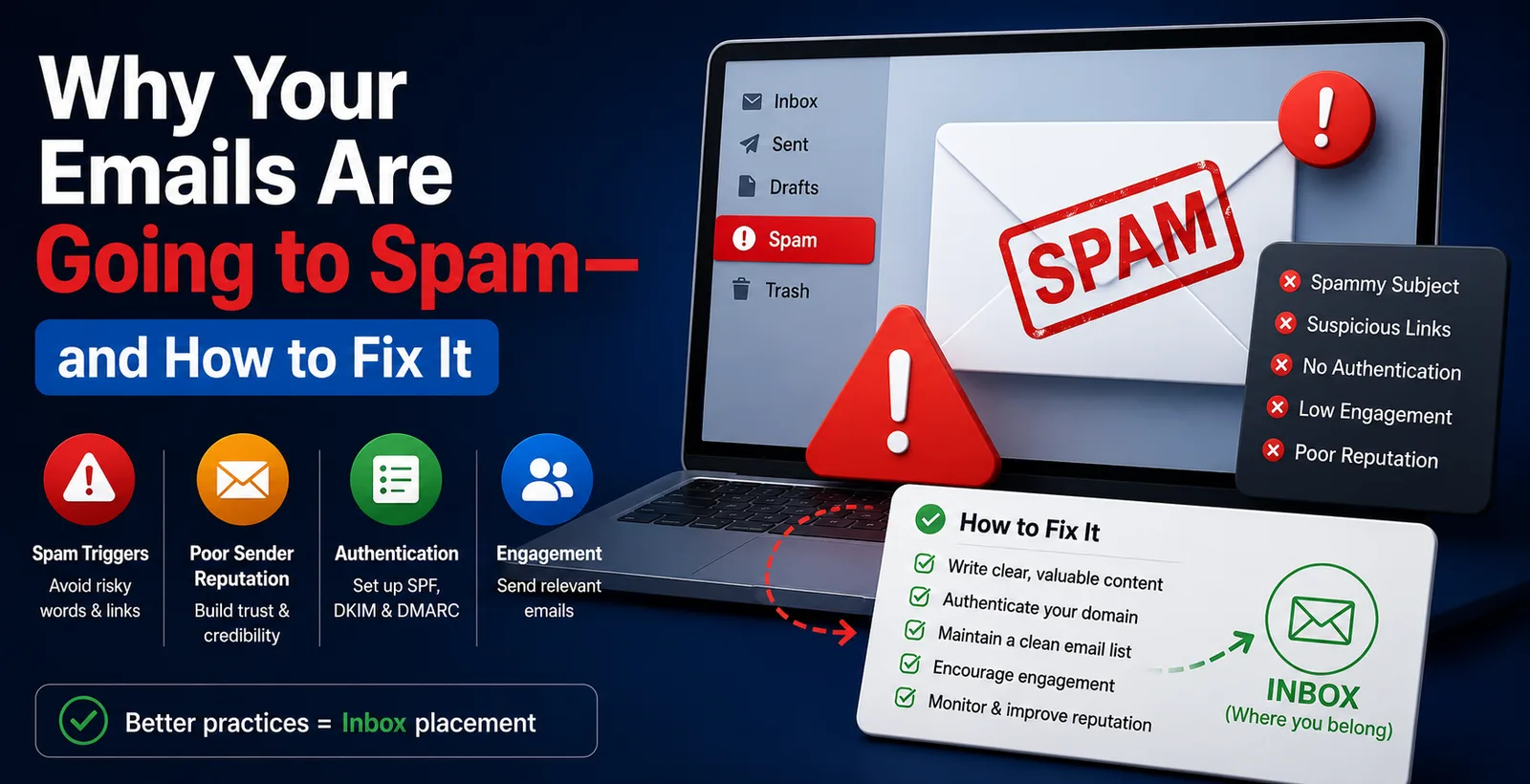
So why do emails go to spam in the first place? I said above that the three main things to check for when an email doesn’t reach people are the content, the subject line, and the “email settings”. It is actually the last of these which is by far the most important, because the email filters look at a wide range of signals to try and work out whether any given email is likely to be wanted by the recipient. The most important of these is the “sender reputation”. This is a measure of how trustworthy the sender of the email is perceived to be by the filters, and it is calculated on the basis of a wide range of signals including, but not limited to, whether the recipient has opened or clicked on previous emails from the same sender, whether they have moved previous emails from the sender to a folder, whether they have reported previous emails from the sender as spam, and so on. When enough of these signals go the wrong way, then the filters start to treat subsequent emails from the same sender with suspicion, and they may well end up in the user’s spam folder before they are even opened.
When I was sending email for an ed-tech startup, a small SaaS product, and for a skincare brand based in Jaipur, I noticed something strange. No matter how technically correct my email was, the deliverability would vary depending on the sender’s domain history. In the case of the skincare brand, for instance, the open rates would be lower because of the domain’s history. This brand had to wait for almost four months for the deliverability to start improving on the rebranded domain of the ed-tech startup I was working for before. I had to run the email for the rebranded domain of the ed-tech startup for almost four months before Gmail started trusting it the way it used to trust the old domain of the ed-tech startup.
So what actually causes the spam folder problem? 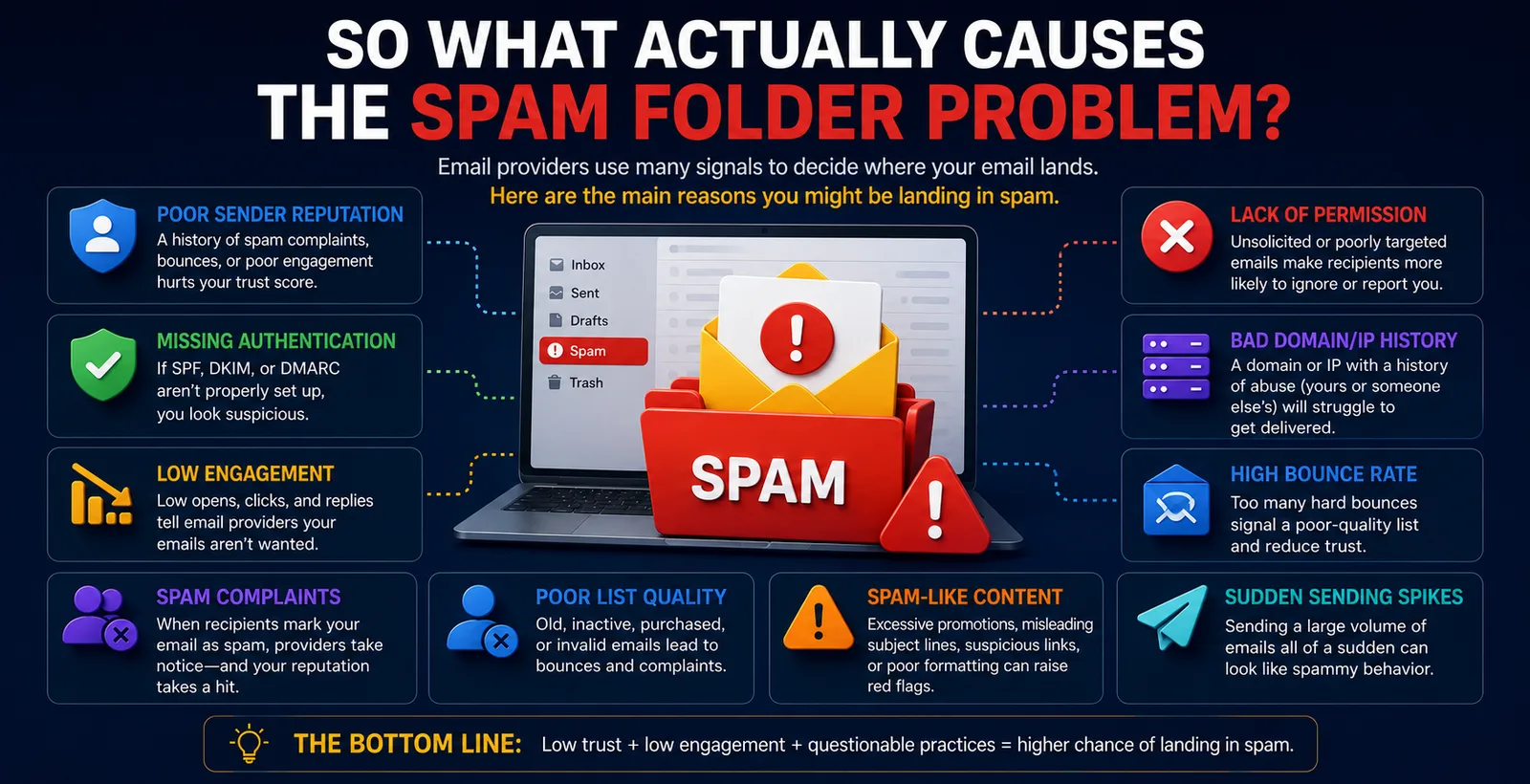
When checking for email deliverability issues, the first thing to check for are your authentication settings for your sending domain. There are three things that need to be in place:
1. A valid SPF record for your domain. This tells receiving mail servers which mail servers are allowed to send email from your domain.
2. A valid DKIM record for your domain. This adds a digital signature to your emails, so that receiving mail servers can check that your email hasn’t been tampered with on the way.
3. A valid DMARC record for your domain. This sets out what action a receiving mail server should take if it determines that an email that appears to be from your domain has failed to pass either of the above checks. Additionally, it gives you a means to track down who is sending email from your domain and impersonating you.
Google and Yahoo (not Gmail, note the difference in branding here) recently implemented DMARC policy for senders of large volumes of email to their users’ inboxes. Specifically, for senders of more than 5,000 emails per day, it’s now required that a valid DMARC policy record exist for their sending domain. I was recently called in by a distressed client – a real estate agent whose transactional emails to his buyers were suddenly being delivered to their spam folders. After a few minutes of investigation, we discovered that his IT guy had set up the necessary SPF record for the sending domain a few years prior, but had never bothered to set up the corresponding DKIM or DMARC records. It took us about 20 minutes to sort the problem out and get the emails delivering correctly again.
List hygiene is the boring one nobody wants to hear about
Buying email lists is still very much common practice in the email marketing industry. Even though, for over a decade now, the word of mouth among industry peers has stated very clearly: No, please, for the love of all things good and decent, do not buy email lists. I was recently contacted by the financial services arm of a well-established international consumer company (we’ll just call them “Fintech co” for the purposes of this explanation). Fintech co had bought a “verified business leads” list of 40,000 or so contacts from a vendor they’d found online, and by the third campaign of sending marketing email to this list, the domain’s reputation had plummeted to an all-time low. And, worse, the company’s transactional emails (password reset notifications, etc.) were getting picked up by the email client’s spam filters as well. And, of course, the company in question realized far too late that once a domain’s reputation had dropped to a certain point, All emails sent from that domain would suffer, not just the offending campaign.
I will note that fixing deliverability problems is not glamorous. In my experience of managing email for two different organizations, in the end, the best way to get deliverability sorted is to pause all marketing email for about 6 weeks and start from a clean slate. In the meantime, the list will have been cleaned down to only people who have interacted with the brand in some way before (i.e. openers, clickers, etc.- in my experience of looking at lists, about 80% of the people on a list are complete unknowns to the sender who have been added via opt-in some time before, but never actually opened or clicked on any email). After that, it is simply a case of gradually upping the sending volume to a healthy number over a period of time. It's not exactly the sort of thing that people want to hear when they are telling you that they are desperate for email to start performing for them and they want it to start performing quickly.
Warming up a new domain matters more than people think 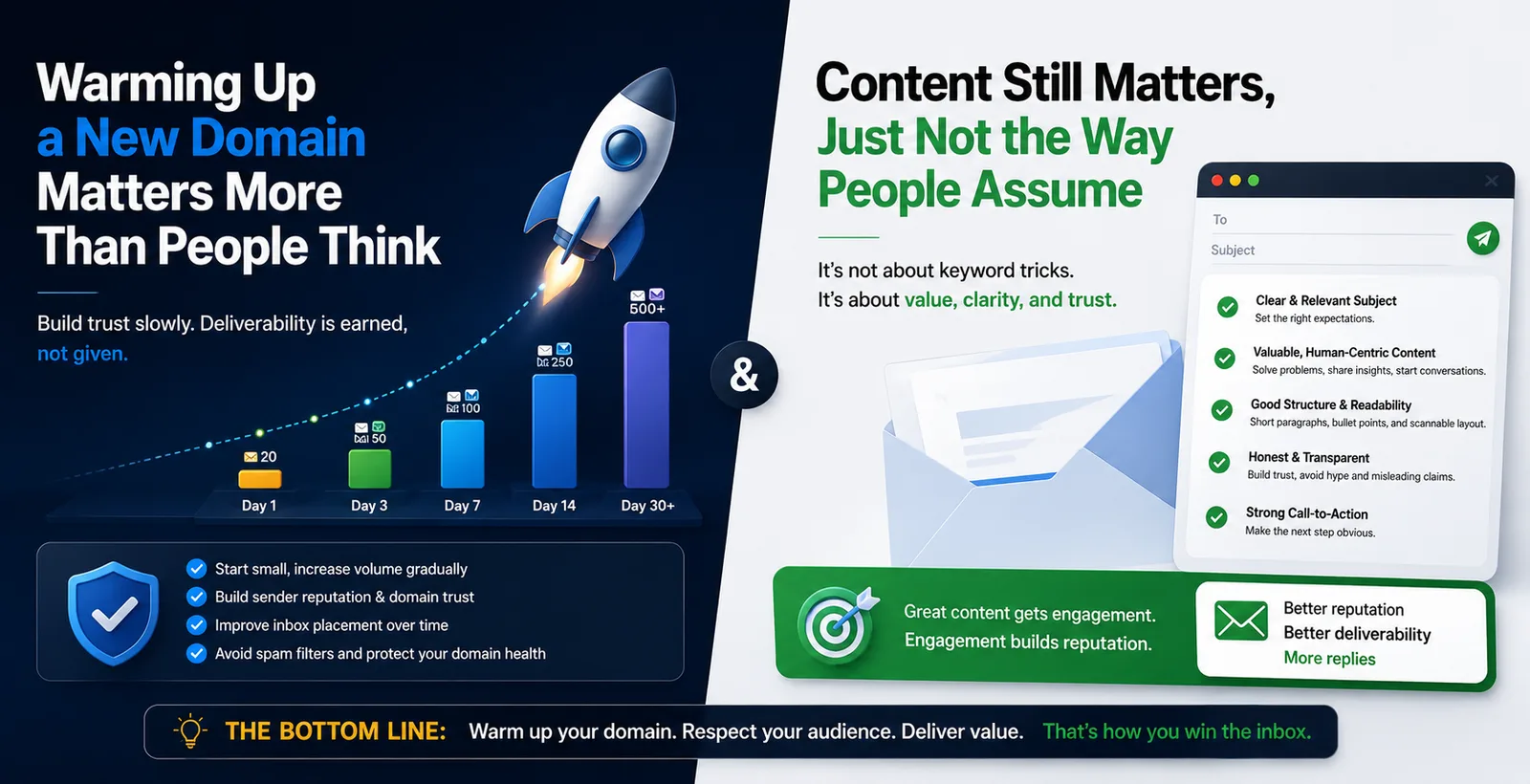
Warming up a new domain is a simple thing to do. Firstly, it takes time to start seeing results, so don’t expect everything to change overnight. Typically, we like to start by sending out 200-500 emails a day to the most engaged subscribers (i.e. people who have opened/clicked in the last 30-60 days). From there, we gradually increase the amount of emails we send out over the course of two to three weeks.
Content still matters, just not the way people assume
What you actually send, and what you promise in the subject line to send, is what will hurt your deliverability the most. This is because the biggest indicator of whether or not your email is spam is whether or not you delivered on your promise. The client mentioned above was delivering great content but this was not relayed in the subject lines and because of this their deliverability suffered. They were reporting a 4% open rate for their Diwali email campaign when normally they would achieve an open rate of 22-24% for their regular campaign. Also note that emails which are largely made up of images (as opposed to text) can sometimes still be picked up by older filters. However, in general, the content of your email and how it relates to the subject line of your email is becoming less and less of a factor in how your emails are filtered. This is because most email filters these days are able to read the content and context of your email. This is why it is so much more important to deliver on your promises and to ensure that your emails are highly relevant to the people that you are sending them to.
The template that I used for my friend’s restaurant consisted of one large hero image for each of the specials of the week, followed by a 3-line blurb for each image. As can be expected, this looked great but was awful for deliverability. About 30% of the time, his newsletter would end up in the Gmail user’s Promotions tab. But there were also times when the entire newsletter would end up in spam for the Gmail user. And this wasn’t limited to Gmail users, as there were also times when the same newsletter would end up in spam for users of regional email providers. Many of these email providers still use very old filters for dealing with HTML emails, and as such, his newsletter would get flagged due to the high ratio of images to text. In the end, we just re-built the template to consist of paragraph after paragraph of text that described each of the specials of the week. We included only 1 hero image for the entire newsletter, instead of 5, and this immediately had the desired result, as complaints to his list immediately dropped, and the occurrences of his newsletter ending up in spam for his subscribers immediately dropped as well.
What I'd actually check first, if I were you
Run your domain through Google Postmaster Tools, if you have a big list of Gmail users. Running a test email through mail-tester.com will also highlight any obvious authentication issues. Take a look at your last 3 campaigns, including the unsubscribe rates and the number of spam complaints. If you recently switched to a new email service provider, rebranded your domain or even bought a list (don’t do that!), that would explain everything.
Removing a pop-up for re-permissioning readers for subscription confirmation was the right thing to do for the above-mentioned beauty skincare client from Jaipur. In the end, the open rate ended up going up from 22-24% to 28-30% over a space of 6 weeks. We cleaned up a large number of garbage email IDs. This was a beautiful way to weeding out your list of readers in email marketing for making maximum profits. Your honesty in list building in email marketing is just as important as the best setup for email marketing using tools to achieve better results in terms of ROI for business.
Don’t expect to fix deliverability issues overnight. As noted earlier, authentication records take around 24 to 48 hours to propagate, once updated, to begin showing impact. The biggest challenge of all is repairing a sender’s reputation, which can take weeks to recover once it’s been damaged, unlike hours to fix content issues. It’s therefore sensible to concentrate on domain-related fixes, rather than spending hours tweaking the copy and subject line. In 9 out of 10 cases, that’s where the root cause of the problem will be found.
One more thing, since I keep getting asked what I actually use for this. I test send lists before big mailings through Pingovo.
It instantly checks all email addresses and designates them as ‘invalid’, ‘fushed’, ‘catch-all’, ‘invalid disposable’, ‘invalid use of catch-all’ or ‘bounces anyway’ (e.g. due to a fintech mailing list that in the meantime has already torched the domain’s reputation).
Additionally, Pingovo has a warm-up tool that doesn’t have to be configured in a spreadsheet in a step-by-step process. For instance, if you recently changed to a new domain, Pingovo can do the slow but necessary ramp-up for you. For 100 free credits Pingovo checks your mailing list for free and you can instantly test send your own list. For this no credit card is required and thus there is absolutely no reason not to test send your list before your next mailing instead of after.